The zero-based budgeting app that bends to how you actually spend.
Give every dollar a job and decide what happens next — instead of just watching transactions roll in. Manual entry by design.
Field rules
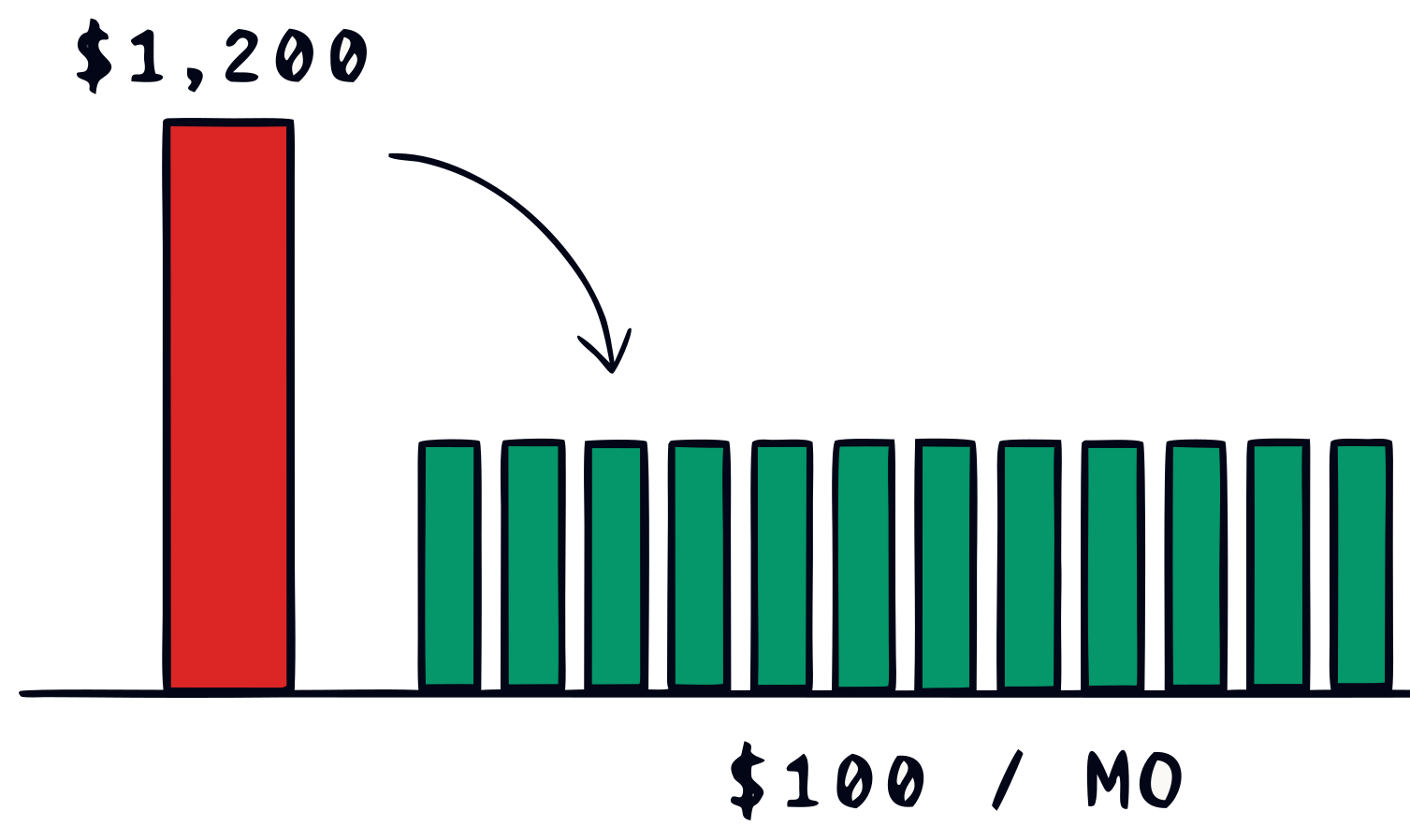
Spread one-time costs across the months they actually hit.
Your $1,200 car insurance isn’t a January problem. Stop pretending it is — let it draw down monthly like a real liability.
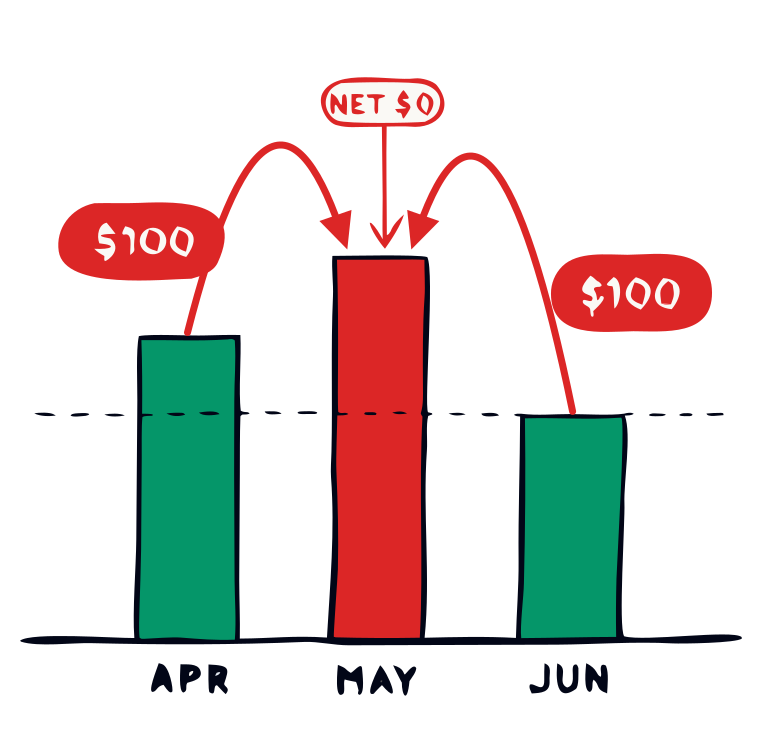
Pull from next month when groceries blow up.
Real budgets bend. So does this one. Move dollars between months without losing the zero-based math underneath.
Every feature came from someone who actually budgets.
No roadmap committee. No corporate growth bets. Just what the people using it asked for next — shipped in days, not quarters.

See how it works
Watch a one-minute video of BudgetLabs and some of the features within.
Field reports
Thank you, this is exactly what I was looking for! Honestly, I’ve tried several different budgeting apps, and this one is most user friendly!
App Store review
Why I built this
Budget like you mean it.
I used YNAB. I used Mint. Both pulled in my transactions automatically, and somehow that made me care about them less. There’s something that happens when you enter a purchase yourself — even if it takes five seconds — that makes it real.
I’d been doing that in a spreadsheet for fifteen years. When I finally got the chance to turn that process into a real product, BudgetLabs is what came out. Manual entry is the feature, not the friction.
Coming from YNAB? I wrote up exactly how BudgetLabs compares as a YNAB alternative — same zero-based method, $19.99 a year instead of $109.
Plans
Choose your plan.
Core planning is free forever. Pro adds AI when you want admin work to disappear.
Free
$0 foreverEverything you need to run a strong monthly budget.
- Full budgeting dashboard and categories
- Transactions, calendar, debt and assets
- Lab scenarios and goals
- One budget
- Hank AI limited to 5 chats / day
- Smart Import limited to 1 / day
No card required
Pro
Best valueMore from your budget: AI coaching, faster analysis, smarter categorization — without giving up control.
- Everything in Free, plus higher AI limits
- Hank: up to 250 chats a day
- Smart Import: clean, categorized transactions instantly
- Family Sharing: up to 5 members
- Unlimited budgets: for you, your family, or any situation
Cancel anytime · no data deleted
Questions
Things people ask.
Direct answers. If something’s missing here, ask the community — Chris reads it.
Q.01Is BudgetLabs really free?
Yes. Core budgeting — categories, transactions, debt and asset tracking, the Lab, scenarios and Goals — is free forever. Pro ($1.99/mo or $19.99/yr) raises the AI usage limits and unlocks Family Sharing.
Q.02Does BudgetLabs do zero-based budgeting?
Yes. Every dollar of your income gets assigned to a category before the month starts. A floating widget on the dashboard surfaces whether you’re surplus (have unassigned dollars left to plan) or deficit (planned more than your income covers) and walks you to a balanced budget.
Q.03What’s the cheapest budgeting app?
At $1.99/mo or $19.99/yr, BudgetLabs is the cheapest paid zero-based budgeting app in the category. The free tier covers the full core loop, so most people don’t need to upgrade right away.
Q.04Can I share my budget with family?
Yes — Family Sharing is included with Pro. One $1.99/mo (or $19.99/yr) subscription covers up to 5 members on the same shared budget. No per-seat charge. Invite by email; the recipient signs up or in and gets full read & write access.
Q.05Do I need bank connections?
No — and BudgetLabs doesn’t offer them. Transactions go in by hand, by CSV import, by Smart Import (paste raw bank text or upload a PDF; AI extracts the rows for you to review), or by snapping a receipt. The brief pause where you confirm a transaction is the point — it’s what keeps you paying attention.
Q.06Can I request new features?
Absolutely. Send feature requests through Support. I review them weekly and prioritize based on real user impact.