Best Copilot Money Alternatives in 2026 (Honest Ranking)
August 30, 2026
Copilot shipped a web app, so the old "it's Apple-only" complaint is mostly dead — though the web app isn't feature-complete yet. Here's what's still actually true about Copilot, and the honest ranking of alternatives for Android households, deeper investment tracking, and anyone who thinks $95/yr is a lot to watch their money.
Take control of your money with BudgetLabs
Free forever — premium features just $1.99/mo. No credit card required.
Sign Up NowDisclosure first: I built BudgetLabs, one of the apps on this list. It gets a labeled section near the end, and I've named where every other app genuinely beats it.
Before the ranking, something most "Copilot alternatives" pages published this year still have wrong: Copilot now has a web app. It's at app.copilot.money, it's included in the normal subscription, and it works in any browser — including on Windows. Copilot's own site now describes itself as an app for "Web, iPhone, Mac and iPad."
That matters, because "you can't use it on a Windows machine" was the single most-cited reason to look elsewhere. It's now mostly untrue — with one caveat worth knowing before you act on it: Copilot says the web app isn't yet feature-complete with the iOS and Mac apps. It covers transactions, accounts, budgets, investments, and recurring expenses, and they're still closing the gap. So if Windows is your only platform, you'd be adopting the least finished version of the product.
Here's what's actually still true about Copilot, and who should genuinely leave over it.
What's still true about Copilot in 2026
| Copilot Money | |
|---|---|
| Price | $13/mo, or $95/yr (works out to $7.92/mo) |
| Trial | 1 month |
| Platforms | iPhone, iPad, Mac, and Web (web not yet feature-complete) |
| Android | No — still the real gap |
| Coverage | US financial institutions only, 10,000+ supported |
| Method | Tracking with category budgets — not enforced zero-based |
| Standout | Best automatic transaction categorization in the category |
Facts checked against Copilot's own site and help center, August 2026.
Four reasons still worth leaving over:
- Someone in your household is on Android. There's no Android app, and the web app is a partial answer at best for someone's daily phone check.
- You're outside the US, or hold accounts that are. Copilot supports US institutions only.
- You want deeper investment analysis — cost basis, per-security returns, capital gains reporting — rather than seeing your portfolio alongside your spending.
- You want a budget, not a tracker. Copilot shows you what happened, beautifully. It won't make you plan.
If none of those apply, staying put is a reasonable answer. The rest of this post is for people where one does.
Bottom line up front
Staying on Apple, want more depth: Banktivity, from $59.99/yr. Mac-native, serious investment tooling, cheaper than Copilot.
Someone's on Android: Monarch, $99.99/yr. It's the household answer and nothing else comes close on sharing.
Want to spend less on a tracker: Quicken Simplifi, around $47.88/yr — roughly half of Copilot.
Want to actually change your spending: YNAB ($109/yr) or BudgetLabs ($19.99/yr, free tier).
Want free: Empower or NerdWallet for tracking, Actual Budget if you'll self-host, or BudgetLabs' free tier if you want a budgeting method rather than a dashboard.
The rankings
1. Banktivity — the Mac-native power option
From $59.99/yr across three tiers, built exclusively for Mac, iPhone, and iPad by a company that's been doing Mac finance software for a long time. Connects to 14,000+ banks. 30-day trial, no card required.
Its own pitch leans on investment depth: per-security tracking, IRR and ROI, cost basis, lot-specific selling, and capital-gains reporting — none of which Copilot claims to offer. If your reason for leaving Copilot is "I want to analyze my portfolio, not just see it," that's the gap Banktivity is built to fill, and it's $35/yr cheaper.
It also does envelope budgeting, which is a real method rather than categorization after the fact.
The catch: it's a heavier, more traditional application. Copilot is unquestionably the more pleasant thing to open every day. Banktivity is what you graduate to when pleasant stops being the priority. It's also Mac/iPhone/iPad only — so it doesn't help with Android at all.
2. Monarch Money — the answer for mixed-platform households
$99.99/yr for Core, $199 for Plus. iOS, Android, and web. Sharing for up to five members is included in the base tier rather than upsold.
If your reason for leaving is that someone in your house has an Android phone, this is the pick and the decision is basically over. Monarch's web app is also the best in the category for sitting down with your finances on a real screen.
The catch: it's $5/yr more than Copilot for a single user, and its automatic categorization isn't as good — Copilot genuinely wins that comparison. See Monarch vs Copilot Money for the full head-to-head.
3. Quicken Simplifi — half the price, same job
Around $47.88/yr ($3.99/mo billed annually, $6.99 month to month). Connects to 14,000+ institutions, generates a Spending Plan from your income minus bills, and runs on iOS, Android, and web.
If you like what Copilot does but wince at $95, this does most of it for roughly half. It's also the app most reviewers name as the closest feel to old Mint.
The catch: no free tier, and sharing is limited to one additional person. More in Monarch vs Simplifi and YNAB vs Quicken Simplifi.
4. YNAB — if the real problem is that nothing changed
$109/yr, and a completely different proposition: YNAB doesn't track your money, it makes you assign every dollar a job before you spend it. Overspend somewhere and it forces you to take that money from somewhere specific.
If you've used Copilot for a year, enjoyed the charts, and your spending is the same — the dashboard was never going to be the fix. Enrolled college students get a free 365-day plan. Full numbers in YNAB Pricing 2026.
The catch: it's the most expensive option here and the most demanding. It's also a genuinely worse tracker than Copilot, which is the point.
5. Empower — free, and strong on investments
The Personal Dashboard is free: net worth, cash flow, portfolio analysis, retirement planning. For someone whose accounts skew toward brokerage and retirement, it covers the investment side better than Copilot does, at no cost.
Take control of your money with BudgetLabs
Free forever — premium features just $1.99/mo. No credit card required.
Sign Up NowThe catch: Empower is a wealth-management firm and the free dashboard is the front door — expect an advisor to reach out if your balances justify it. Budgeting is the weakest part of the product.
6. NerdWallet — the best genuinely free tracker
Free, ad-supported, syncs accounts, includes a credit score. If you're leaving Copilot purely over price and you want tracking rather than budgeting, this is the closest free equivalent.
The catch: ads, and the business model is lead generation. Nothing like Copilot's polish.
7. Actual Budget — free if you'll self-host
Open source, genuine zero-based budgeting, free when you run it yourself (around $4/mo hosted). Runs anywhere, including a Mac.
The catch: self-hosting is a real requirement, not a footnote, and bank connectivity is more limited.
The labeled bias section: BudgetLabs
My app, fenced off so you can skip it.
BudgetLabs is $1.99/mo or $19.99/yr — about a fifth of Copilot — with a free tier that covers the entire core budgeting loop, no trial clock and no card required. It runs on iPhone, iPad, and Mac, with the desktop experience being the web app, so it works on Windows too.
The difference is what it's for. Copilot is the best-designed way to watch your money. BudgetLabs is built to make you decide about it: full zero-based budgeting, a dashboard widget showing whether you're in surplus or deficit with a button to assign the extra or trim a planned amount on the spot, snowball and avalanche debt payoff with live what-if forecasting, and an Annual Events planner plus transaction amortization so yearly bills stop landing on one month.
There's no bank sync, deliberately. Smart Import parses a pasted statement, PDF, screenshot, or forwarded email, flags likely duplicates, and you approve what lands — free accounts get one import a day, Pro raises that to 100. Family Sharing for up to 5 people at no per-seat charge is also a Pro feature.
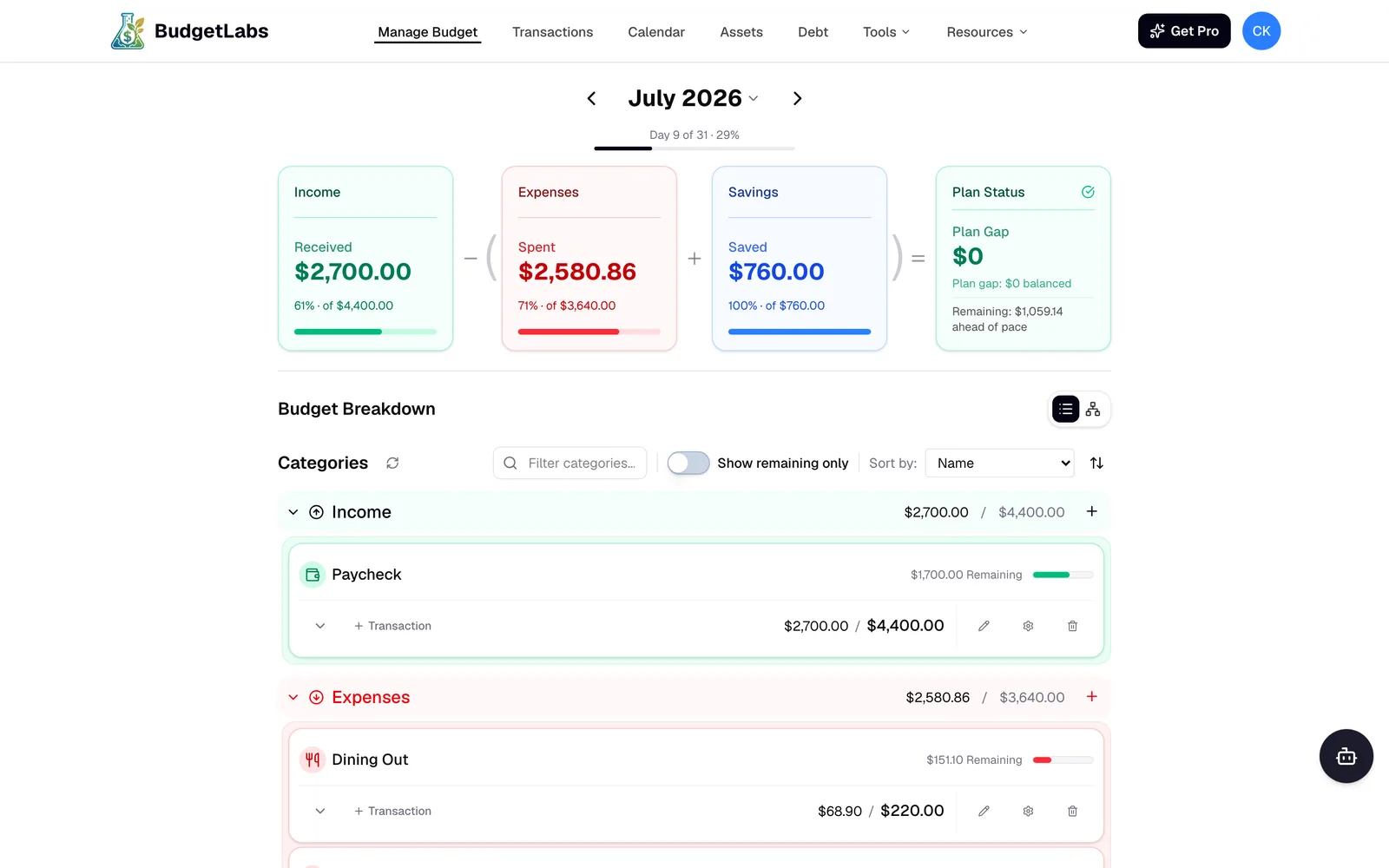
The actual BudgetLabs dashboard — every dollar assigned, plan gap $0. See the full product tour →
Where Copilot genuinely beats it: automatic categorization is Copilot's flagship and mine doesn't compete — you approve transactions instead of having them filed for you. Copilot syncs your banks; I've chosen not to. And on investments, BudgetLabs records holdings and tracks allocation against targets, but there's no live sync, and no IRR or capital-gains reporting — so it's behind Copilot on currency and behind Banktivity on depth.
Neither of us solves Android. If that's your problem, scroll back to Monarch.
The full head-to-head is BudgetLabs vs Copilot Money.
Want to budget, not just track? BudgetLabs runs full zero-based budgeting — snowball and avalanche debt payoff — at $1.99/mo, with a free tier that covers the entire core budgeting loop. AI Smart Import and Family Sharing are Pro features. No credit card, no trial countdown.
→ Start a free budget in 2 minutes
How to choose
- Someone's on Android → Monarch. Decided.
- Staying Apple, want portfolio depth → Banktivity.
- Same job, less money → Simplifi.
- Free → Empower for investments, NerdWallet for everyday tracking.
- Nothing changed after a year of tracking → YNAB or BudgetLabs.
- "I can't use it on my work PC" → mostly fixed. Copilot's web app works in any browser, though it isn't feature-complete with the Mac and iOS apps yet. Worth a look before you switch.
Frequently Asked Questions
Does Copilot Money work on Android?
No. Copilot supports iPhone, iPad, Mac, and a web app, but there is no Android app. For mixed-platform households, Monarch is the usual answer.
Does Copilot Money have a web app?
Yes — at app.copilot.money, included with a normal subscription, and it works in any browser including on Windows. Copilot notes it isn't yet feature-complete with the iOS and Mac apps, but it covers transactions, accounts, budgets, investments, and recurring expenses.
What is the best Copilot Money alternative for Mac?
Banktivity, from $59.99/yr — Mac-native, built around deeper investment tooling, and cheaper than Copilot. If you want budgeting rather than tracking, BudgetLabs runs on Mac at $19.99/yr with a free tier.
How much does Copilot Money cost?
$13/month or $95/year, which works out to $7.92/month. There's a one-month free trial.
Is there a free alternative to Copilot Money?
Yes — Empower's Personal Dashboard and NerdWallet are both free trackers, Actual Budget is free if you self-host, and BudgetLabs has a free tier covering its core budgeting loop.
Does Copilot Money work outside the US?
No. Copilot supports US financial institutions and accounts only. Monarch, Simplifi, YNAB, and Banktivity all have broader options depending on where you are.
Is Copilot Money worth $95 a year?
If you want the most polished spending tracker on Apple hardware and you're in the US, it's a fair price for what it is. If you want deeper investments, Android support, or a budgeting method that changes behavior, you're paying for the wrong thing.
Related reading
- Monarch vs Copilot Money: Which to Pick in 2026?
- BudgetLabs vs Copilot Money: 2026 Comparison
- YNAB vs Copilot Money: Method vs Polish
- Origin vs Monarch vs Copilot: Which to Pick in 2026?
- Best Mint Alternatives in 2026 (Honest Ranking)
- Best Zero-Based Budgeting Apps in 2026 (Honest Ranking)
- YNAB Pricing 2026: What It Actually Costs
- Zero-Based Budgeting: A Practical Guide
Take control of your money with BudgetLabs
Free forever — premium features just $1.99/mo. No credit card required.
Sign Up NowChris
Founder, BudgetLabs
One honest budgeting-app comparison a month
No spam, unsubscribe anytime.
Keep reading
- Best Mint Alternatives in 2026 (Honest Ranking)Mint shut down in 2024 and nothing has replaced all of it. Ranked by which part of Mint you actually miss — free automatic tracking, the credit score, or the whole financial picture — with real 2026 prices and the honest catch on each.
- Origin vs Monarch vs Copilot: Which to Pick in 2026?Three all-in-one money apps, three different bets: Origin ($99/yr, $1 first-year promo) bundles planning and taxes, Monarch ($99.99/yr) owns households, Copilot ($95/yr) owns Apple. An honest three-way for 2026.
- 9 Best EveryDollar Alternatives in 2026 (Honest Ranking)9 EveryDollar alternatives ranked by a founder who competes with all of them — from $1.99/mo. The cheapest, the closest zero-based options, the best free tiers, and who should actually stay on EveryDollar.